Creating online courses used to mean long hours of filming, editing, and reshooting scenes. Today, that process looks very different. Vidnoz AI is a free AI-powered video creation platform built to simplify video production for creators, educators, and businesses. It is ISO/IEC 27001:2022 certified for Information Security Management. This means your data and content are kept safe throughout the creation process.
That matters if you are an instructor aiming to publish more lessons in less time. Traditional editing eats up hours per video. With Vidnoz AI, you can generate a full course video in minutes instead of days. That is where the real time savings come from.
This article covers how Vidnoz AI can help course creators scale production without burning out. We will cover its main features, step through how to use it, and explain why it is becoming a popular tool for online learning.
Why Course Creators Are Switching to Vidnoz AI
Filming yourself for every lesson is tiring. Reshooting a scene because of one mistake wastes even more time. Vidnoz AI removes these pain points by using AI avatars and voices instead of manual filming. You write a script, pick an avatar and the platform does the rest.
Many educators are moving away from traditional editing software for this reason. It simply takes too long. Vidnoz AI cuts that editing time dramatically, often by up to 80%.
Key Features That Speed Up Course Production
1900+ Lifelike Avatars
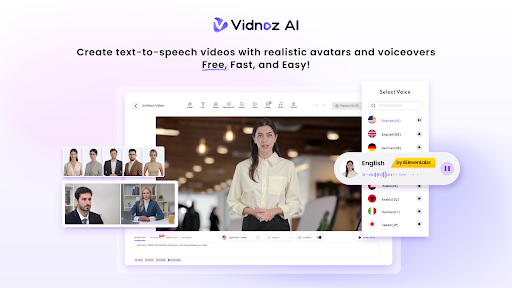
Vidnoz AI offers 1900+ lifelike avatars across different industries and roles. Whether you teach business, health, tech, or design, there is an avatar that fits your subject.
You are not limited to generic characters either. You can always use an existing or customizable avatar to match your context. Some popular options include:
- Your digital twin, a personalized avatar of yourself
- Expressive avatars with natural gestures and emotion
- Product avatars designed to showcase items on screen
This flexibility keeps your course videos relevant and professional.
2000+ Lip Sync AI Voices
Good narration makes or breaks a course video. Vidnoz AI provides 2000+ natural-sounding AI voices in over 140 languages. These voices are powered by ElevenLabs, Microsoft, and Google, three of the most trusted names in voice technology.
This lip-sync feature automatically matches your avatar’s mouth movements with the voice track, creating natural and realistic speech. It helps deliver a smooth, engaging learning experience for students, regardless of the language they speak.
2800+ Pre-Designed Video Templates
It is challenging and time-consuming to start from a blank screen. Vidnoz AI solves this with over 2800 pre-designed video templates. Templates include training videos, tutorials, marketing content, and more.
You don’t have to create a video from scratch; just choose a template that fits your lesson. Then you customize the text, avatar, and voice. This alone can shave hours off your editing time.
Free Daily Use
Every user gets 30 credits of free video generation per day. This lets you test the platform, create short lessons, or build course previews without any upfront cost. It is a low-risk way to see how Vidnoz AI fits into your workflow before committing further.
How to Use Vidnoz AI: A Simple Step-by-Step Guide
Even with no experience using an AI video tool, you can easily get started with Vidnoz AI Video Generator. The following is a simplified version of the process.
Step 1: Choose a Template & Avatar
Start by browsing the template library. Pick one that matches your course topic. Then select an avatar that represents your brand or teaching style.
Step 2: Create AI Voiceover
Type or paste your script into the text box. Choose a voice from the 2000+ options available. Vidnoz AI will generate natural-sounding narration in seconds.
Step 3: Add Custom Touch
Now personalize your video. Add your logo, adjust colors, insert text overlays or include background music. This step helps your course videos feel unique and on brand.
Step 4: Generate AI Video and Share
Once you are happy with the preview, click Generate. Vidnoz AI will render your finished video. From there, you can download it or share it directly to your course platform.
Why This Matters for Scaling Course Production
Many course creators face the challenge of meeting content demands. Students are expecting new lessons regularly. Manual filming and editing simply cannot keep pace.
Vidnoz AI gets rid of the top hurdles by using AI voices, templates and avatars. No camera or studio and editing skills required. This means:
- Faster turnaround from script to finished video
- Lower production costs over time
- Consistent quality across every lesson
- Easier updates when course content changes
For teams producing dozens of lessons, these savings add up fast.
Final Thoughts
When it comes to scaling up your online course production, it does not have to be a stressful or time-consuming process. Vidnoz AI unlocks video creation for all with its lifelike avatars, natural AI voices, thousands of templates, and easy, four-step workflow.
Ready to cut your editing time and publish courses faster? Try Vidnoz AI today and start your first free video in minutes.