Have you ever wondered why some local service websites get many clicks but very few paying customers? Getting people to visit a website is only the first step toward business growth. The real challenge is turning their interest into action through a clear and simple online experience.
Every page, button, and contact form can affect conversion and influence whether visitors choose your business. Small changes can make a big difference in how people respond. This guide explores practical ways to attract customers, build trust, and turn more website visits into real bookings.
Make Every Service Page Clear and Helpful
A service page should quickly tell visitors what your business does and how you can help. People should not have to search through long paragraphs to find basic details about your services. Use clear headings, simple words, and short descriptions to explain what customers can expect.
Each page should focus on one main service and answer common customer questions. Explain who the service is for, what the process involves, and why someone may need it. This service page checklist helps keep your content useful and makes it easier for visitors to find the details they need.
Your contact details should also be easy to find on every service page. Show your phone number, service area, and business hours where visitors can see them. When people can quickly find these details, they are more likely to take the next step.
Improve Website Conversion With Clear Calls to Action
Visitors need a clear reason to contact your business after reading your website. A strong call to action tells them exactly what to do next, such as requesting a quote or booking a visit. Use simple words that make the next step feel easy and natural.
Place these buttons where visitors can easily see them without scrolling too far. For example, add a booking button near the top of each service page and another near the bottom. Keep the wording direct so customers understand what will happen when they click.
Avoid giving visitors too many choices on one page because this can make decisions harder. Focus on the main action you want them to take, whether that means calling, sending a message, or booking online. A clear path helps turn clicks into bookings without making the website feel pushy.
Make Mobile Booking Simple and Fast
Many people search for local services using their phones, often while they are busy with other tasks. A website must work well on small screens and allow visitors to find important details without zooming in. Buttons should be large enough to tap, while text should remain clear and easy to read.
Long forms can stop people from asking for help because they take too much time to complete. Ask only for the details needed to begin, such as a name, phone number, email, and service request. You can collect more information later when a staff member speaks with the customer.
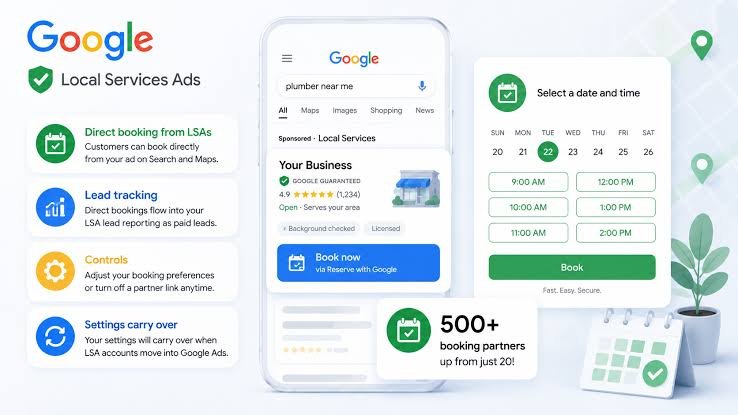
Good online booking optimization also means making the booking process quick and easy to follow. Let visitors choose a service, select an available time, and confirm their request with little effort. Show a clear message after submission so customers know their booking or inquiry went through.
Build Trust Before Asking Customers to Book
People want to feel safe before they pay for a service or invite a worker into their homes. Your website should show that your business is real, active, and ready to help. Add a clear business address or service area, working contact details, and useful information about your team.
Customer reviews can also help visitors feel more sure about their choice. Share honest feedback that explains how your business solved real problems and treated customers well. Photos of past work can give people a better idea of the quality they can expect.
Trust also grows when your website explains prices, service steps, and business policies in simple terms. If prices depend on the job, explain what affects the final cost and offer a way to request a quote. Being open about these details can reduce doubt and help visitors feel ready to book.
Respond Quickly to Every New Customer Inquiry
A visitor who sends a message often expects a quick reply, especially when the service is urgent. Long waits can cause people to contact another business instead. Set up a clear process so every new inquiry reaches the right person as soon as possible.
Automatic replies can let customers know that their message was received. However, these messages should not replace a real response from your team. Follow up with a helpful answer, ask only needed questions, and explain what the customer should expect next.
Strong small business lead generation depends on what happens after someone makes contact. Keep a record of new leads, note when they arrive, and track whether they become paying customers.
Businesses can also use guidance from DataDriven Digitals to improve the steps between website visits and confirmed appointments. Regular follow-up helps prevent good leads from being lost.
Turn Website Data Into Better Booking Results
Website data can show which pages bring visitors and which ones lead to customer inquiries. Check how many people visit each service page, click contact buttons, and complete booking forms. These details help you see where customers lose interest during their visit.
If a page gets many visits but few inquiries, review its message and booking process. The service details may be unclear, the contact button may be hard to find, or the form may ask for too much information. Test one change at a time so you can see which update brings better results.
You should also compare results across different services and devices. A booking form that works well on a computer may be hard to use on a phone. Keep checking your results and make small updates based on what customers actually do.
Make Every Website Visit Count
Getting more clicks is useful, but turning those visits into real customers is what helps a local business grow. Clear service pages, simple forms, strong reviews, and fast replies can make a big difference. Each step should help visitors feel ready to contact your team.
Focus on making the customer journey easy from the first visit to the final booking. Review your website often, fix problems, and use conversion data to guide better choices. Small changes can lead to more calls, stronger leads, and more booked jobs over time.
Did this guide help you? Browse the rest of this section for more advice on a variety of topics.