Have you ever tried to file your GST return but the website would not open? This can be very stressful. Many taxpayers face this problem when they need to finish their tax work before the last date.
The GST website helps people file returns and pay taxes online in India. But sometimes the portal becomes slow or stops working. This can happen because of server problems or a weak internet connection.
If the GST website not working issue is troubling you in 2026 then don’t worry. In this guide we will explain the main reasons behind these problems. You will also learn simple ways to fix them.
Why Is the GST Website Not Working?
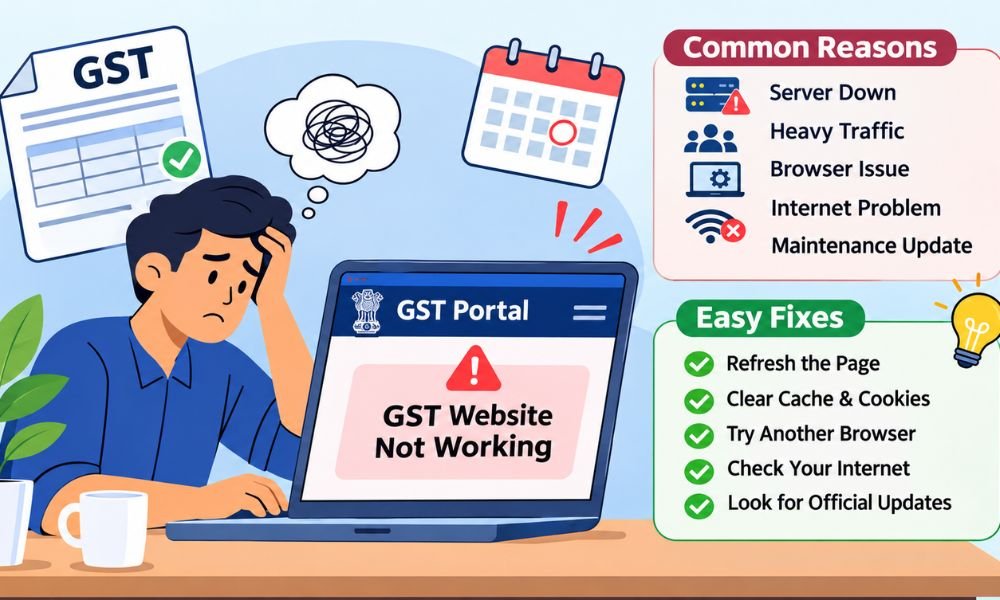
The GST website may stop working for many reasons. Sometimes the problem comes from the GST server. Other times your browser or internet connection may be causing trouble. Finding the cause is the first step.
Many people use the GST portal to file returns and check tax details. When too many users visit the website at once it may become slow. This often happens near the last date for filing returns.
The good news is that many GST website problems are easy to fix. You may only need to refresh the page or change your browser. However some server problems need time before the website works again.
Common Reasons for GST Website Not Working
One common reason for the GST website not working is heavy traffic. Many businesses try to file their returns near the deadline. This puts extra pressure on the website and may cause loading problems.
Old browsers can also create trouble. Your browser saves website data to help pages open faster. But old files may stop the GST portal from working well after an update. Clearing these files can help.
Sometimes the problem comes from your internet connection. Weak Wi-Fi or network changes may stop pages from loading. Website updates and security settings can also block access. Checking these things can help you find the cause.
GST Website Not Working Today? Check Server Status
Is the GST website not working today? Before changing your browser settings you should check whether the GST server is down. Sometimes the website stops working for many users at the same time.
Start by visiting the official GST website at www.gst.gov.in. Look for any notice about website repairs or planned updates. You can also check official GST support channels for news about service problems.
Websites such as Downdetector may show reports from other users. These reports can help you spot a wider problem but they do not confirm an official outage. If the server is down then wait and try again later.
GST Website Not Working on Chrome? Easy Fixes
Google Chrome is a popular browser for opening the GST portal. But sometimes the GST website does not load in Chrome. This may happen because of old cache files or browser settings that block parts of the page.
The first thing you can do is clear your browser cache and cookies. Then close Chrome and open it again. You can also try incognito mode by pressing Ctrl + Shift + N on your computer.
If the GST website not working problem continues then update Chrome. You can also turn off browser extensions for a short test. If nothing helps then try opening the portal in Firefox or Microsoft Edge.
Continue reading: Tyna Robertson: What Happened to Kennedy Urlacher’s Mother
GST Website Not Working on Mobile or PC
Sometimes the GST portal opens on a computer but not on a mobile phone. This can happen because some website tools work better on desktop browsers. A small screen may also make certain forms harder to use.
Your internet connection can also affect how the website works. If the GST portal keeps loading then try another network. You can switch from Wi-Fi to mobile data or restart your router to test the connection.
Also check your device date and time. Wrong settings may cause secure website errors. If you need to upload files or use a digital signature then a computer with the right software may work better.
GST Website Not Working? Fix Login Problems
A GST login problem can stop you from checking your tax details or filing returns. This may happen when you enter the wrong username or password. Sometimes an old login session can also cause trouble.
If you cannot log in then check your details first. Make sure your password is correct. If you have forgotten it then use the password reset option. You may need to confirm your identity through an OTP.
Sometimes the OTP arrives late or does not arrive at all. Check your registered phone and email. If the session has expired then log in again. If the problem continues then contact the official GST helpdesk.
Common GST Portal Error Codes and Their Meanings
Sometimes the GST website shows an error code instead of opening a page. These codes help you understand what went wrong. Some errors come from the server while others happen because of browser or login problems.
For example an HTTP 403 error means access to a page was refused. An HTTP 500 error usually means something went wrong on the server. An HTTP 504 error means the server took too long to reply.
You may also see errors when using a Digital Signature Certificate (DSC). This can happen if the token or signing software is not working. Read the error message carefully before trying again. Different errors need different fixes.
GST Website Not Working? Try These Quick Fixes
If the GST website not working problem continues then start with some easy steps. First refresh the page and check your internet connection. Sometimes a short network problem can stop the website from opening.
Next clear your browser cache and cookies. Close the browser and open it again. You can also restart your computer or phone. If the website still does not open then try another browser or internet network.
Some browser extensions and VPN services may also cause trouble. Turn them off for a short test if it is safe to do so. If the GST server itself is down then wait for service to return.
GST Website Not Working During Return Filing
Imagine you are filing your GST return and the website suddenly stops working. This can be stressful when the last date is near. Many taxpayers face loading errors while uploading forms or sending return details.
GSTR-1 and GSTR-3B are two common GST returns. Sometimes a form fails because required details are missing or incorrect. Check the error message and review your entries before trying to submit the return again.
Payment problems can also happen. For example you may pay your tax but the payment does not appear right away. Check your challan and payment status before paying again. This can help you avoid paying twice.
GST Website Not Working? Contact GST Helpdesk
If you have tried the basic fixes but the GST website not working issue remains then you may need help. The official GST helpdesk can guide taxpayers who face login errors or trouble while filing returns.
You can visit the official GST website at www.gst.gov.in to find support details. You can also use the GST helpdesk number 1800-103-4786. Check the official website for the latest contact details before calling.
When reporting a problem explain what happened and when it started. Share the error message and a screenshot if possible. Keep your complaint number safe so you can check the progress of your request later.
How to Avoid GST Website Problems in the Future
Nobody wants to face website errors while filing taxes. One simple way to avoid stress is to prepare your GST returns early. Waiting until the last day can make things harder if the portal becomes slow.
Keep your browser updated and use a stable internet connection. Check your login details before starting. If you use a digital signature then make sure the token and signing software are ready to work.
You should also save your tax records and payment receipts. Check official GST notices for planned website updates. These small steps cannot prevent every server problem but they can make tax filing much easier.
Continue reading: Alma Gonzales: Everything About Richard Thomas’ Ex-Wife
Conclusion
The GST website not working problem can be frustrating when you need to file taxes on time. It may happen because of heavy traffic or server issues. Browser problems and weak internet can also stop access.
The good news is that many problems have simple fixes. Clearing your browser cache or changing your network may help. If the server is down then checking official updates and waiting may be the best choice.
Always check your filing status before sending the same return or payment again. If the problem continues then contact the GST helpdesk. With a little planning and the right steps you can make GST filing easier in 2026.
(FAQs)
Why is the GST website not working today?
The GST website may stop working because of heavy traffic or server problems. Sometimes the portal is under maintenance. You can check the official GST website for updates. Also try another browser to see if the problem continues.
How can I check if the GST server is down?
Visit the official GST website at www.gst.gov.in. Look for any notice about server problems or maintenance. You can also check Downdetector for user reports. If many people face the same issue then the server may be down.
Why is the GST website not opening in Chrome?
The GST website may not open in Chrome because of old cache files or browser settings. Try clearing your cache and cookies. You can also use incognito mode or update Chrome. If needed try another browser.
How do I fix a GST login problem?
First check your username and password. Make sure you enter the correct details. If you forgot your password then use the reset option. You can also clear your browser cache and try logging in again.
Why is my GST OTP not coming?
Your GST OTP may be delayed because of network problems or a busy service. Check your registered mobile number and email. Wait a little before asking for another OTP. If the problem continues contact GST support.
What should I do if the GST portal shows a 500 error?
An HTTP 500 error usually means something went wrong on the website server. You can refresh the page after waiting a few minutes. If the error continues check official GST updates. Server problems often need to be fixed by the website team.
Why does the GST website keep showing session expired?
The GST portal may show a session expired message when you stay inactive for some time. Browser cookies or connection problems may also cause it. Log in again and avoid leaving the page open without using it.
What should I do if my GST return is not submitting?
First check whether all required details are correct. Look for missing fields or error messages. Make sure your internet is working. Before trying again check if the return was already filed to avoid confusion.
Can I file GST returns when the portal is down?
No. You cannot submit GST returns through the portal while the filing service is unavailable. You can prepare your return details and wait for service to return. Keep screenshots of errors and check official deadline updates.
How do I contact the GST helpdesk?
You can contact the GST helpdesk through the official website at www.gst.gov.in. The helpdesk number is 1800-103-4786. Explain your problem clearly and share any error messages. Keep your complaint number for future updates.
Continue reading: State Wide Area Network: What It Is and How It Works