Digitizers talk in shorthand. “Add edge-walk underlay, bump the pull comp, and sequence it center-out for the cap frame” makes perfect sense to them and very little to the person paying for the file. This glossary translates the terms you’ll see on proofs, quotes and support emails into plain English.
It was put together with input from the team at OurDigitizer, an online embroidery digitizing and vector art service for embroidery shops, apparel brands and merch businesses.
Files and formats
Digitizing. Converting artwork into a stitch file that tells an embroidery machine where every stitch goes, in what order, at what length and density.
Stitch file. The machine-readable output of digitizing. It stores needle positions, stitch types, color stops, jumps and trims, not a picture.
DST. The Tajima format and the most widely read file type on commercial machines. It stores stitches and color stops but not actual thread colors.
PES. Brother’s format, common on home and semi-commercial machines. It stores thread color information.
EXP and JEF. EXP is used by Melco and Bernina machines. JEF is Janome’s format.
Vector art. Artwork built from paths instead of pixels (AI, EPS, SVG, PDF). It scales without blurring and gives digitizers clean shapes to work from.
Vector conversion. Redrawing a low-resolution image as clean vector art, usually before digitizing or screen printing.
Auto-digitizing. Software that converts artwork to stitches automatically. Fine for simple, bold shapes. Weak on small text, gradients and caps.
Stitch simulation. An on-screen preview of how the file should sew. Useful, but it can’t show puckering or fabric behavior.
Sew-out. A real stitched sample of the file, the most reliable proof of quality.
Stitch count. Total stitches in a design. A typical left chest logo runs 5,000 to 9,000 stitches. It drives machine time and, at some services, price.
Stitch types
Satin stitch. Parallel threads laid back and forth across a narrow shape, giving a smooth, raised, glossy look. Best between about 1.5mm and 7 to 10mm wide.
Split satin. A wide satin column broken into staggered sections so threads don’t float too long and snag.
Fill stitch (tatami). Rows of short stitches in an offset pattern for covering large areas.
Running stitch. A single line of stitches following a path, for fine detail and outlines.
Bean stitch. A running stitch sewn back and forth three times for a bolder line.
Knockdown stitch. A light, low-density layer sewn first to flatten textured fabric like pique or fleece so detail sits on top.
Chenille. A looped, towel-like texture made on specialized machines, typical on varsity jackets.
Appliqué. A piece of fabric sewn onto the garment as part of the design, edged with a satin border.
3D puff. Satin stitches sewn over foam to create raised lettering, common on caps.
Capping. Extra stitches across the open ends of puff columns so the foam doesn’t poke out.
Settings inside the file
Density. How close stitch rows sit. Fill rows around 0.4 to 0.45mm apart suit most stable fabrics. Tighter feels stiff. Looser lets fabric show through.
Underlay. Foundation stitches sewn before the visible stitches to stabilize fabric.
Center run underlay. A single line down the middle of a narrow satin column.
Edge-walk underlay. Stitches tracing just inside a shape’s edge to hold borders crisp.
Zigzag underlay. A zigzag under wider satin columns for support and slight loft.
Pull compensation. Making shapes slightly wider in the file because thread tension pulls fabric inward. Knits need more than wovens.
Push compensation. Shortening column ends slightly because stitches push fabric outward at the ends of a column.
Stitch angle. The direction stitches run. Changing angles across large fills reduces ridging and uneven pull.
Sequencing. The order the machine sews each element. Good sequencing cuts trims and keeps layers aligned.
Center-out sequencing. Sewing from the middle of a design outward, standard for caps to keep the design centered.
Jump stitch. A thread carried across the surface between two elements without sewing.
Trim. A command that cuts the thread, usually to remove a jump.
Tie-in and tie-off. Tiny locking stitches at the start and end of each element so it doesn’t unravel.
Color stop. A pause in the file where the machine switches to the next needle or thread color.
Production
Hoop. The frame that holds fabric and stabilizer taut during sewing.
Hoop burn. Marks left on fabric by a hoop clamped too tightly.
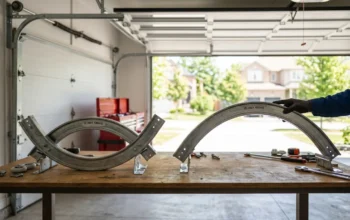
Cap frame. A curved frame that holds a cap’s crown on the machine.
Stabilizer (backing). Material behind the fabric that supports the stitches. Cutaway stays on permanently for knits. Tearaway is removed after sewing on stable fabrics.
Topping. A water-soluble film on top of pile fabrics like towels and fleece so stitches don’t sink in.
Thread weight. Thread thickness. Lower numbers are thicker. 40wt is the standard; 60wt suits tiny text.
Flat-to-cap conversion. Rebuilding a flat-garment file for caps with new sequencing and compensation, not just resizing it.
Keep this page handy when you read your next proof. Knowing the words makes it much easier to ask for exactly the change you need.