Have you ever tried to find one car in a huge parking lot? It can take a lot of time. Now think about finding a car in a lot with hundreds of other vehicles. This can be hard.
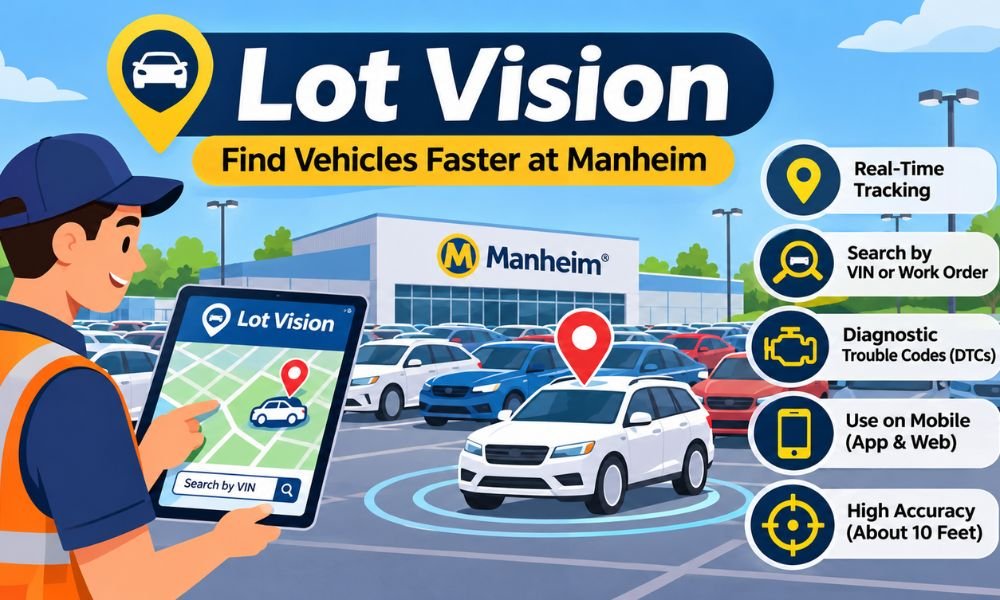
This is where Lot Vision comes in. It is a smart tool from Manheim that helps dealers and drivers find cars faster. It shows where a car is parked and helps users reach it with less work.
In this guide, we will explain what Lot Vision is and how it works. We will also look at its main features and how to use it. You will learn how this tool makes finding cars much easier.
What Is Lot Vision?
Lot Vision is a vehicle tracking system made for Manheim auction lots. It helps car dealers and transporters find vehicles without searching every row. The system uses GPS and wireless tools to show where cars are parked.
Manheim first introduced Lot Vision in 2019. The goal was simple. It wanted to help buyers find cars faster and make vehicle pickup easier. Before this system, workers often had to search large lots by hand.
Today, Lot Vision remains a useful tool for people who buy and move cars at supported Manheim sites. It helps them spend less time looking for vehicles and more time getting their work done.
How Does Lot Vision Work?
Lot Vision works with a small tracking device placed in a car. In most cases, the device connects to the car’s on-board diagnostic port. This port is often used to check problems with a vehicle.
The device sends location data through a wireless network. Lot Vision then shows the car’s position on a digital map. Manheim has said the system can locate vehicles within about 10 feet under suitable conditions.
For example, a dealer may buy a car at Manheim Dallas. Instead of walking around the whole lot, the dealer can search for the car using its VIN. The map then helps the dealer find it.
How Does the Tracking Device Work?
The tracking device helps Lot Vision know where a vehicle is parked. It sends location details to the system. This makes it easier to find a car even when it is parked far away.
Some vehicles do not have a suitable diagnostic port. Manheim has also used trackers attached to steering wheels for these cars. This helps the system work with more types of vehicles.
How Does VIN Search Work?
Every car has a special number called a Vehicle Identification Number or VIN. This number helps tell one car from another. Lot Vision uses it to find the right vehicle.
Users can enter the VIN into the search box. They can also use a work order number. If the car has an active tracker at a supported lot, its location can appear on the map.
Key Features of Lot Vision
Lot Vision offers several useful features for dealers and transporters. These tools help users find cars and check vehicle details. They also make work easier at large auction sites.
One of its best features is location tracking. Users can search for a car and see where it is parked. This saves time and reduces the need to ask workers for help.
The system also offers search tools and map features. Some vehicles may have fault code data available. These details can help users learn more about a car before they inspect it.
Real-Time Vehicle Tracking
Lot Vision uses wireless tracking to show vehicle locations. This is helpful when cars are moved around a busy auction lot. Users can check the map instead of searching every parking row.
The system was designed to locate cars within about 10 feet. However, the result may vary based on the device and its signal. The map should be used as a guide to the car.
Search by VIN or Work Order
Users can find a vehicle by entering its VIN or work order number. This makes the search process simple. They do not need to know the parking row before starting.
Lot Vision also supports searching for several cars at once. Some versions have allowed bulk searches for up to 300 vehicles. Users should check the current limit on their Manheim service.
Digital Maps and Show My Position
The digital map is another helpful part of Lot Vision. It shows where the selected car is parked. Users can also turn on Location Services on their phone.
The Show My Position feature helps users see their own place on the map. They can then walk toward the car. This is useful when the auction lot is large or hard to know.
Vehicle Diagnostic Trouble Codes
Lot Vision can also show Diagnostic Trouble Codes or DTCs for some vehicles. These codes can point to possible car problems. They may help buyers know what needs a closer check.
For example, a code may point to an engine issue. However, a code alone does not tell the full story. Buyers should still check the car and get help from a trained mechanic when needed.
How to Use Lot Vision to Find Cars
Using Lot Vision is simple once you know the steps. You do not need to be a car expert. You only need the right vehicle details and access to a supported Manheim location.
First, open the official Lot Vision service through Manheim. Choose the auction site where your car is parked. Then enter the VIN or work order number in the search box.
If the vehicle is found, its location will appear on the map. You can turn on your phone’s Location Services to see where you are. Then follow the map to reach the car.
Step 1: Open the Lot Vision Service
Start by opening the official Manheim website. You can use the Lot Vision page at mymanheim.com/lotvision where the service is available. Some users may also reach it through their Manheim account.
Make sure you are using the correct website. Avoid unknown pages that ask for your password. This helps keep your account details safe while you search for vehicles.
Step 2: Enter the Vehicle Details
Next, enter the VIN or work order number. You can often find these details on your purchase papers or gate pass. Check the number before you start the search.
A wrong number may stop the system from finding your car. If no result appears, check the number again. Also make sure you have chosen the correct Manheim auction location.
Step 3: Find the Car on the Map
Once the search is complete, the system can show the car on a map. This helps you see where the vehicle is parked. You can then plan how to reach it.
Turn on Location Services if you want to see your own position. Walk toward the marked area and check the nearby cars. Always match the VIN before taking the vehicle.
Lot Vision Login: How to Access Your Account
Lot Vision login gives users access to the tracking service through supported Manheim tools. Dealers and transporters may need a valid Manheim account to use certain features.
To begin, visit the official Manheim website. Open the Lot Vision service and follow the steps shown on the page. If a login is needed, enter your account details.
Some auction sites may also offer QR codes for quick access. The exact steps can vary by location. Users should follow the instructions given by their Manheim auction site.
What If Lot Vision Login Is Not Working?
Sometimes users may have trouble signing in. This can happen because of a wrong password or a poor internet connection. A browser problem may also stop the page from loading.
First, check your login details and internet connection. You can also try another browser. If the problem continues, use the official account help options or contact Manheim support.
How to Use the Manheim Lot Vision App
Mobile access makes Lot Vision easier to use while walking around an auction lot. Users can search for vehicles on their phones instead of going back to a desk.
Manheim has offered mobile access through its digital services. Users should check the official Manheim website or app listing for the latest Android and iPhone options in 2026.
Once you open the supported mobile service, enter the VIN or work order number. The map can help you find the car. This is useful for dealers and drivers who collect several vehicles each day.
Finding Cars With Your Phone
Imagine you need to collect three cars from a large auction lot. Searching for each one by hand could take a long time. A mobile tracking tool makes this job easier.
You can search for each car and check its place on the map. This helps you move from one vehicle to the next with less confusion. It also makes pickup work more simple.
Using Show My Position on Mobile
Show My Position is useful when you do not know the auction lot well. It uses your phone’s location to help show where you are compared with the selected car.
Make sure Location Services are turned on and allowed for the service. Then check the map as you walk. Remember that phone location may not always be exact, so check the vehicle VIN when you arrive.
Main Benefits of Using Lot Vision
Lot Vision makes finding cars much easier for dealers and transporters. It helps them save time and avoid long searches. This is very useful at busy auction lots where hundreds of cars are parked.
One major benefit is less manual work. Users can check a car’s location on their phone instead of walking through every row. This helps them finish their daily tasks faster.
The system also helps make vehicle pickup easier. Dealers can find purchased cars without asking many workers for help. This saves effort and makes the whole process more simple.
Saves Time When Finding Cars
Finding one car in a large auction lot can take hours. This becomes even harder when several cars look the same. Lot Vision helps users find the right vehicle much faster.
For example, a transporter may need to collect five cars. Instead of searching the whole lot, they can check each car’s location. This helps them plan their work and save time.
Makes Daily Work Easier
Auction workers have many jobs to complete each day. They need to move cars and help buyers. Searching for missing vehicles can slow down their work and cause delays.
With digital tracking, workers can spend less time looking for cars. They can focus on other tasks. This helps make the auction process smoother for everyone involved.
Helps Dealers Make Better Choices
Some vehicles may have fault code details available through the system. These codes can help dealers spot possible problems. This gives them more information before they inspect or buy a car.
However, fault codes do not show every problem. A car may still need a full check. Dealers should use this information as an extra guide rather than a final report.
How Accurate Is Lot Vision Tracking?
Lot Vision was designed to find vehicles within about 10 feet. This level of accuracy can help users find cars in large parking areas. It is much easier than searching without a map.
The system uses GPS and wireless devices to report vehicle locations. These tools help users see where a car was last found. This can reduce confusion when vehicles are parked close together.
However, tracking is not always perfect. A weak signal or a device problem may affect the result. Users should always check the VIN before taking a vehicle from the lot.
What Can Affect Tracking Accuracy?
Several things can affect how well a tracking device works. Poor signals and device issues may cause delays. The location shown on the map may not always match the car’s current position.
For example, a car may have been moved to another row. If the device has not sent a new update, the map may show its older location. This is why checking nearby rows can help.
What If the Car Is Not in the Right Place?
If a car is missing from the marked area, first check the VIN. Make sure you searched for the correct vehicle. You should also check that you selected the right auction site.
Next, refresh the page and look for a new location update. If the car still cannot be found, ask the auction staff for help. They may have more details about its location.
Lot Vision vs Traditional Vehicle Tracking
Before digital tracking became common, finding cars often meant walking around large auction lots. Workers used printed lists and parking records. This could take a lot of time and effort.
Lot Vision offers a faster way to search. Users can enter a VIN and check the vehicle’s location on a map. This makes it easier to find cars without checking every parking row.
Both methods can help people find vehicles. However, digital tracking can reduce manual searches when the tracking device is working well. This is helpful for busy dealers and transporters.
Traditional Tracking vs Lot Vision
| Feature | Traditional Methods | Lot Vision |
|---|---|---|
| Car search | Manual search | Digital search |
| Location | Paper records | Map location |
| Search speed | Often slow | Usually faster |
| VIN search | Check printed lists | Enter VIN online |
| Mobile access | Limited | Supported mobile access |
| Vehicle details | Separate checks | Some fault code data |
| Work needed | More walking | Less searching |
| Location updates | Manual records | Wireless reports |
| Ease of use | Can be difficult | Simple search tools |
Why Is Digital Tracking Better?
Digital tracking helps users find cars without spending hours walking around. It can also reduce mistakes caused by old parking records. This makes daily work easier at large auction sites.
For example, a dealer may buy several cars in one day. A digital map can help the dealer find each one. This saves time and makes vehicle collection more simple.
Common Lot Vision Problems and Easy Fixes
Like any online tool, Lot Vision may sometimes have problems. The website may not load or a vehicle may not appear. These issues can make finding a car harder.
The good news is that some problems have simple fixes. Checking your internet connection or entering the correct VIN may help. You can also try refreshing the page.
If the issue continues, contact Manheim support or ask the auction staff for help. They may be able to check the vehicle details and guide you to the right location.
Lot Vision Login Not Working
A login problem may happen when the password is wrong. It may also happen if the browser has trouble loading the page. First, check your account details and internet connection.
If you still cannot sign in, try another browser. You can also use the official password reset option if it is available. Never share your password with unknown websites.
Vehicle Not Showing on the Map
Sometimes a car may not appear in search results. This can happen when the VIN is entered incorrectly. The vehicle may also be at another auction site or lack an active tracker.
Check the VIN and work order number again. Make sure you have chosen the correct location. If the car still does not appear, ask Manheim staff to check its status.
Location Services Not Working
Location Services help show where you are on the map. If this feature is turned off, the system may not show your position. This can make walking to the car harder.
Open your phone settings and allow location access for the browser or app. Then reload the map. If the problem continues, check your phone’s GPS settings and internet connection.
Map Not Loading Properly
A slow internet connection can stop the map from loading. Browser settings may also cause problems. This can happen on both phones and computers.
Try refreshing the page or using another browser. You can also check your mobile data or Wi-Fi connection. If nothing works, contact the official support team for help.
Is Lot Vision Free and Safe to Use?
Lot Vision has been offered without an extra fee to eligible Manheim clients at supported auction sites. This makes it useful for dealers and transporters who need to find cars.
However, access depends on the auction location and account rules. Not every user may have the same features. It is best to check with Manheim for current access details in 2026.
The system is designed for business vehicle tracking. It helps approved users find cars on auction lots. Users should always follow the service rules and keep their account details private.
Who Can Use Lot Vision for Free?
Registered dealers and transporters may be able to use the service at supported Manheim locations. It can help them find cars before inspection or after a purchase.
The service was made to reduce the time spent searching for vehicles. Users should check whether their auction site supports it. They should also ask about any account needs.
Is Lot Vision Safe for Vehicle Tracking?
Lot Vision uses wireless devices to share vehicle location data. This helps approved users find cars at auction sites. The system is meant for tracking vehicles during auction work.
For safer use, always open the official Manheim service. Do not share your login details with others. Avoid unknown websites that claim to offer free vehicle tracking.
Where Is Lot Vision Available?
Manheim first introduced the system at selected auction locations. Its early rollout included sites in Atlanta and Dallas. Other locations included Orlando and Chicago.
Manheim later planned to bring the system to more auction sites. However, current access may vary. Users should check the official Manheim service before visiting a location.
Continue reading: Edward Abel Smith: Where Is Kate Winslet’s Husband Today?
Conclusion
Lot Vision is a helpful tool for dealers and transporters who work with cars at Manheim auctions. It makes finding vehicles easier by showing their locations on a digital map.
Its main features include VIN search and work order search. It also offers mobile access and location tools. These features can save time and reduce the need for manual searches.
If you often buy or collect cars from auction lots, this system may make your work easier. Just make sure your Manheim location supports it. With the right details, finding your next vehicle can be much faster.
(FAQs)
What Is Lot Vision Used For?
Lot Vision is a vehicle tracking system made by Manheim. It helps dealers and transporters find cars at auction lots. Users can search by VIN or work order number and see the car’s location on a digital map.
Is Lot Vision Free to Use?
Yes. Lot Vision has been offered for free to eligible Manheim clients at supported locations. Dealers and transporters can use it without paying an extra tracking fee. Access may depend on their account and auction site.
How Do I Log In to Lot Vision?
Visit the official Manheim website and open the Lot Vision service. Sign in with your Manheim account if asked. You can then choose an auction location and search for vehicles using their VIN or work order number.
How Accurate Is Lot Vision GPS Tracking?
Lot Vision was designed to locate cars within about 10 feet. It uses GPS and wireless tracking devices to show vehicle locations. However, weak signals or device problems may sometimes affect the accuracy of the map.
Can I Use Lot Vision on My Phone?
Yes. Lot Vision supports mobile access through Manheim’s digital services. Users can search for vehicles and view their locations on a phone. Check the official Manheim website for the latest Android and iPhone access options.
Why Is My Car Not Showing on Lot Vision?
Your car may not appear if you enter the wrong VIN or choose the wrong auction location. The tracking device may also be offline. Check your details and refresh the page. Contact Manheim staff if the problem continues.
Does Lot Vision Work at Every Manheim Auction?
Not every Manheim location is confirmed to offer Lot Vision. The system first launched at selected auction sites and later expanded. Check with your local Manheim auction to confirm whether vehicle tracking is available.
Can Lot Vision Track More Than One Car at a Time?
Yes. Lot Vision has supported bulk vehicle searches. Some versions have allowed users to search for up to 300 vehicles at once. This helps dealers and transporters find several cars without searching for each one separately.
Does Lot Vision Show Vehicle Problems?
Lot Vision can show Diagnostic Trouble Codes for some vehicles. These codes may point to engine or other car problems. However, they do not replace a full vehicle inspection. Buyers should still check the car before making decisions.
Can I Use Lot Vision to Track My Personal Car?
Lot Vision is mainly designed for vehicles at supported Manheim auction lots. It is not a general GPS tracking app for personal cars. Dealers who need tracking at their own lots can ask about related business tracking services.
Continue reading: Peter Marc Jacobson: The Full Story of Fran Drescher’s Ex-Husband