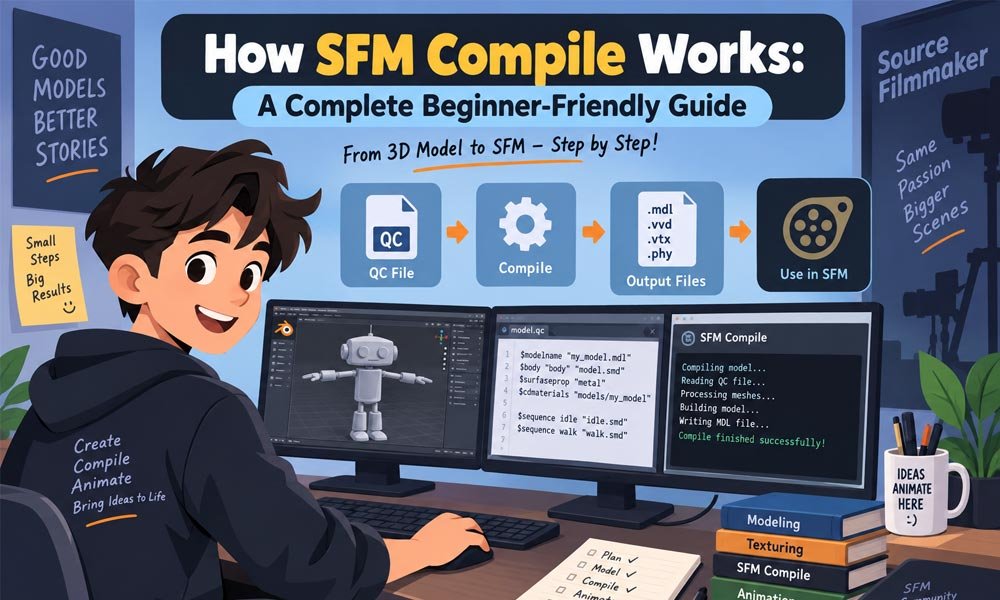
Making a custom model for Source Filmmaker can be fun. You may spend hours making the shape and adding small details. But SFM cannot simply use every file made in Blender. The model must first go through SFM Compile.
Think of SFM Compile like a translator. Your 3D program creates one type of model data. Source Filmmaker needs that data in its own form. The compile process helps turn your source model files into files that Source can load.
In this 2026 guide we will explain the whole process in easy words. We will cover SMD and DMX files. We will also look at QC files and tools such as StudioMDL and Crowbar. Later we will cover common errors and simple fixes.
What Is SFM Compile?
SFM Compile is the process used to build Source-ready model files from source model data. You first prepare the model in a 3D program. Then you export the needed data and give instructions to the Source model compiler.
Imagine that you make a chair in Blender. Blender lets you change its shape and other details. But Source Filmmaker needs its own model files. You can export Source-ready data such as SMD or DMX and then use a QC file to build the final model.
The final result is not always one file. A normal model can have an MDL file with other files such as VVD and VTX. A PHY file may also appear when physics data is used. These files work together when SFM loads the model.
How the SFM Compile Process Works
The SFM Compile process starts with your original 3D model. You may create it in Blender or another 3D program. Before export you should check the mesh and UV setup. A character may also need a clean skeleton and good bone weights.
Next you export the Source-ready model data. SMD and DMX are two common formats used in Source workflows. A QC file then tells the compiler what model data to use. It can also tell the compiler where materials belong and which animations are needed.
StudioMDL reads these instructions and builds the model files. Crowbar can make this process easier by giving you a visual way to work with the compiler. After compilation you place or check the model in the right SFM game folder and test it.
Important Files Used in SFM Compile
Several files can appear during an SFM Compile project. SMD or DMX files can carry model and skeleton data. They may also contain animation data. These are source files. They are not the same as the final model files loaded by SFM.
The QC file is very important. Think of it as a set of building instructions. It tells StudioMDL what should be included. It can name the final model and point to model data. It can also define material paths and animation sequences.
After a successful compile you will normally see an MDL and supporting files such as VVD and VTX. Physics data can create a PHY file when needed. Materials are handled separately. VMT files describe materials while VTF files hold Source texture data.
Best Tools for SFM Compile
You do not need many tools to begin SFM Compile. Blender is a popular choice for making and fixing 3D models. With Source-focused export tools it can also prepare SMD or DMX data for use in the Source model pipeline.
StudioMDL is the important model compiler in this process. It reads the QC instructions and builds the files needed by the Source engine. It can be used through command-line tools. This gives experienced users direct control over the compile process.
Crowbar gives users a simpler graphical way to work with Source model compiling. It is useful when you want an easier setup and readable compile output. A basic text editor is also helpful because QC and VMT files are text-based files.
You may also read: What Is Exhentaime? Everything You Need to Know in 2026
Prepare Your Model Before SFM Compile
Good preparation can prevent many problems later. Before starting SFM Compile check the model mesh carefully. Look for parts that should not be there. Check the UV setup too. Also make sure the model size and transforms make sense before export.
Characters need more care than simple props. Check the skeleton and bone names. Make sure the mesh is linked to the correct bones through its weights. If the weights are wrong the model may compile but bend or move badly when you pose it.
Collision data may also need its own simple mesh. It usually does not need all the tiny visual details of the main model. Keeping the visual model and collision setup clear makes later problems much easier to find and fix.
Create a Clean SFM Compile Folder Setup
A clean folder setup can save a lot of time. Keep your source model files together in a clear project folder. Materials should also have an easy-to-follow place. Simple file names make it easier to see what each file does.
For example you might keep the main model source and collision source near the QC file. Your VMT and VTF files can then follow the material folder path expected by SFM. The exact project layout can change but it should always be easy to understand.
Before running SFM Compile do a simple three-path check. Look at the final model path. Then check the material path. Finally check the real destination inside your SFM game folders. If these paths do not match your plan fix them before compiling.
How to Make a Simple QC File
The QC file controls how your model is built. You do not need to make it huge at the start. A small QC is often better for a beginner because there are fewer things that can go wrong during the first compile.
The $modelname command tells the compiler the intended model output path. $body can point to model geometry. $cdmaterials tells Source where the model should look for materials. $sequence can define an animation sequence such as a simple idle action.
If your model needs collision data you can also use $collisionmodel. Start with only the parts your model truly needs. Get the basic model working first. Later you can add skins and bodygroups. You can also add more animations and other advanced features.
A small working QC gives you something very useful: a good starting point. If a new feature later causes trouble you can compare it with the version that worked. This makes SFM Compile much less confusing for a new creator.
How to Run Your First SFM Compile
Once your QC file is ready you can start your first SFM Compile. Crowbar is a simple choice for many new users. Open its compile area. Pick your QC file. Then make sure the game setup points to Source Filmmaker.
You can also use StudioMDL more directly. It reads the QC file and builds the model from the source data. Whichever way you choose you should watch the compile log. Do not close it as soon as the process ends.
The log can tell you if a file is missing or a path is wrong. Start with the first useful error you see. Fix that problem first. Then compile again. This simple habit can save you from making many changes that were never needed.
You may also read: Protocolo Operacional Padrão: The Easy Way to Improve Teamwork and Quality
What SFM Compile Creates
A successful SFM Compile normally makes several files that work together. The MDL is the main model file. But you should not think of the MDL as the whole model. Other files help Source Filmmaker load and show it correctly.
VVD files hold data linked to the model’s vertices. VTX files contain data used when the model is drawn by the engine. A PHY file may also be made when the model uses compiled physics or collision data.
Keep the matching model files together. Do not move only the MDL and leave its needed files behind. Materials are stored separately in the materials folders. Their paths must also be correct or your model may appear with missing textures.
Common SFM Compile Errors and Easy Fixes
Errors are a normal part of SFM Compile. Even a small path mistake can cause trouble. The best approach is not to guess. Read the compile log and check the source files. Fix one problem and test the model again.
A purple and black checkerboard usually means Source cannot find the correct material or texture. Check the VMT file and its texture path. Also check $cdmaterials. A successful model compile does not always mean its materials are set up correctly.
Sometimes the model compiles but you cannot find it in SFM. Check $modelname and your compile target. If StudioMDL says an SMD or DMX file is missing then check the name and location written in the QC file.
Bones can cause another type of problem. A character may load but move in a strange way. In that case check the skeleton and bone weights. Also make sure the animation was made for the right skeleton. The compile itself may not be the real problem.
Simple SFM Compile Tips for Beginners
The easiest way to learn SFM Compile is to start small. Do not begin with a huge character that has many skins and animations. Try a simple prop first. Learn how the basic process works before adding more parts.
Make only one big change at a time. Imagine that your model works today. You add a new bodygroup and it stops working. You now have a strong clue about where the problem started. Ten changes at once make that clue much harder to find.
Keep a copy of your working QC file too. This gives you a safe version to return to. Add skins and animations slowly. Bodygroups and flexes can come later. A simple working model is much more useful than a complex model that will not load.
SFM Compile for Props and Characters
Static props are often easier to prepare. A basic prop may need a mesh and material setup. It may also use a simple sequence and collision model when needed. This makes a prop a good first project for learning the compile process.
Characters usually need more work. They can have a skeleton and many bone weights. They may also use several animation sequences. Some characters need skins and bodygroups. Facial controls and attachments can make the setup even larger.
Do not add every feature just because another QC file has it. Add only what your model needs. Start with the basic character. Make sure it loads and moves correctly. Then add extra features one at a time and test after each change.
Conclusion
SFM Compile may look difficult when you first see all the file names. The process becomes much clearer when you break it into small parts. Prepare the model. Export the source data. Write the QC file. Compile it. Then test the result.
Remember that a successful compile does not always mean everything is perfect. Materials may still need work. Bones may move badly. Collision may need fixing. Treat each problem as a clue and check the part of the workflow connected to it.
The best way to learn in 2026 is still to build a simple working model first. Keep your files clean. Keep your paths clear. Read the compile log when something fails. Once the basic model works you can slowly add more features.
With practice SFM Compile stops feeling like a wall between Blender and Source Filmmaker. It becomes a normal part of making custom SFM models. Start small and keep a working version nearby. Then build your model one clear step at a time.
You may also read: Eidesk: Everything You Should Know About the Old Web Platform