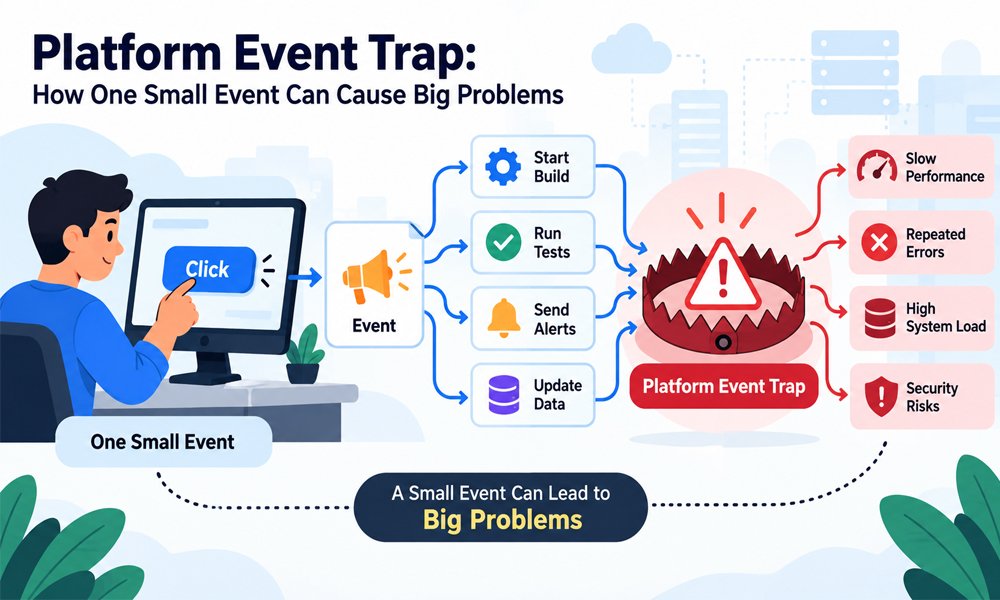
Think about clicking one button on an app. You expect one thing to happen. But that click may start many jobs behind the screen. It may update data. It may send a message. It may also start another event.
This is normal in many systems in 2026. Apps and online tools are more connected now. They can share data and react to changes very fast. This saves time. But it can also create problems when events are not controlled well.
One small event can sometimes start a long chain of unwanted actions. We can call this kind of problem a Platform Event Trap. In this guide we will explain what it means. We will also look at its causes and common examples.
What Is a Platform Event Trap?
A Platform Event Trap is a simple way to describe a problem with events in a system. It is not one single type of error. It can happen when events repeat or start actions that were not planned.
An event is simply something that happens in a system. A person may click a button. A customer may place an order. A file may change. New code may also be sent to a system. Each action can create an event.
Now think about an online shop. A new order creates an event. That event should start the right work once. But what if it appears twice? The shop may do the same work twice. That is where event control becomes important.
How Does a Platform Event Trap Work?
Most event systems have a simple flow. First an action happens. The system creates an event. Another part of the system sees that event. It then starts the work linked to that event.
The trouble starts when this flow does not stop where it should. Event A may start Event B. Event B may then start Event A again. The two events can keep waking each other up. This creates an event loop.
A Platform Event Trap can also happen when the same event is handled more than once. At first everything may look fine. Later the extra work can grow. The system may become slow or show errors that seem hard to explain.
Why Platform Event Trap Matters in 2026
Modern apps often use many services at the same time. One action can move through several parts of a system. This makes apps fast and useful. It also means a small event problem can travel much farther than before.
For example a developer may send new code. That action can start a build. The build can start tests. More tools may check the code. After that another job may prepare the new version for release.
Now imagine one step keeps starting again. More jobs may appear. More system power may be used. Errors may also grow. This is why understanding a Platform Event Trap matters when teams build connected systems in 2026.
Common Causes of a Platform Event Trap
One common cause is a bad event loop. One event starts another event. The second event changes something that starts the first event again. Without a clear stopping rule the same work may continue many times.
Too many triggers can cause trouble too. A team may tell the system to react to every small change. This sounds useful at first. But soon there may be more events than the system really needs. Finding important events becomes harder.
Weak testing is another cause. Bad retry rules can also make the problem worse. A failed event may try again and again. Poor settings or missing checks can turn a small error into a much larger Platform Event Trap.
Platform Event Trap and Event Loops
Event loops are one of the easiest ways to understand this problem. Imagine two people. The first person tells the second person to clap. Every clap tells the first person to speak again. The cycle keeps going.
Software can act in a similar way. Event A changes some data. That change creates Event B. Event B then changes the first data again. A new Event A appears. Without a stop rule the loop can continue.
These loops can use extra system power. They may create large logs and repeated alerts. They can also make an app slow. Teams should map which event starts which action. This can help them find circular paths before they cause trouble.
Platform Event Trap in CI/CD Pipelines
CI/CD pipelines help teams build and test software. They can also help release new code. Much of this work happens on its own. A developer sends code once and several jobs may start without anyone pressing more buttons.
This becomes a problem when a trigger starts the wrong job or starts the same job many times. A failed job may also retry too often. In a large pipeline these repeated jobs can waste time and make the real problem harder to find.
Security issues can happen in pipelines too. Exposed keys or unsafe code are serious risks. But they are not always a Platform Event Trap by themselves. It is better to keep event-flow problems and security problems clear when checking a pipeline.
Platform Event Trap in Salesforce
Salesforce can use platform events to let different parts of a system share updates. One part sends an event. Another part receives it and starts its work. This can help teams connect many jobs without making users wait.
Problems can start when a team expects every event to act like a normal direct request. Events may run in the background. A repeated or late event can cause trouble if the system is not ready to handle it safely.
Teams should also think about event limits and access rules. They should know who can send events and who can receive them. Clear rules and good testing can lower the chance of a Platform Event Trap in Salesforce.
Platform Event Trap in Event-Driven Apps
Event-driven apps react when something changes. Think about an online shop. When a customer places an order the system may update stock. It may also send a message and tell another service to prepare the order.
This works well when each event has one clear job. Trouble starts when an update creates another update that starts the first action again. The app may keep doing the same work. This can make it slow and waste system power.
Duplicate events can create problems too. Imagine an order event arriving twice. The system should know that the order was already handled. Good event design helps stop repeated work and keeps a Platform Event Trap from growing.
Warning Signs of a Platform Event Trap
A slow system can be one warning sign. An app may suddenly take longer to load or finish simple jobs. This does not always mean there is an event problem. Still it gives the team a good reason to check.
Repeated errors are another useful clue. Look at the system logs. Does the same event appear again and again? Are jobs starting many times? A sudden rise in event activity may show that something is not working as planned.
Too many alerts can also be a warning. When hundreds of similar alerts appear the important message can get lost. Teams should watch event counts and failed jobs. Finding these signs early can stop a Platform Event Trap from becoming worse.
How to Prevent a Platform Event Trap
Start with a simple question. Does this event really need to run again? The system should check before doing important work twice. This is very useful for orders and payments and other jobs that should happen only once.
Teams should also break event loops. If Event A starts Event B then check what Event B does next. It should not start Event A again unless there is a clear reason and a safe way to stop the cycle.
Retry limits are important too. A failed job should not try forever. Teams can also limit very fast repeated actions. Good testing helps as well. Test repeated events and late events before the system goes live.
Smart Ways to Manage Platform Event Trap Risks
Clear event IDs can make problems easier to find. Think of an event ID like a small name tag. When something goes wrong developers can use that ID to follow the event and see where it travelled.
Systems should also be ready for duplicate events. A repeated event should not always repeat the important action. For example the same payment event should not charge a customer twice. The system should first check if that work is already complete.
Failed events also need a safe place. Instead of trying forever the system can hold them for later review. Clear logs and useful alerts help teams find these events. These simple steps make Platform Event Trap risks easier to control.
Platform Event Trap Examples and Key Lessons
Imagine a person clicks a buy button once. The system receives the event twice. Without a check it might try to create two orders. A simple event ID and a check for past work can help prevent this problem.
Now think about an app update. Event A changes some data. That creates Event B. Event B changes the same data again and starts Event A. Soon both events are running in a loop. A clear stop rule can break it.
A CI/CD pipeline can face a similar issue. One code change starts a job. That job creates another change that starts the pipeline again. Good trigger rules can stop this cycle. Small checks can prevent a large Platform Event Trap.
Conclusion
Modern systems can do a lot of work from one small action. That makes software fast and useful. But it also means one poorly controlled event can start many unwanted actions. Small mistakes can become much larger problems.
A Platform Event Trap is a useful way to describe these event problems. It can include loops and repeated work and too many triggers. Slow apps and repeated errors and unusual event activity can all be useful warning signs.
The answer is not to stop using events. Events are very helpful when they are designed with care. Keep each event simple. Add clear checks. Set retry limits. Test the full flow. In 2026 a good system should be fast but also safe and stable.
You may also read: SEO by Highsoftware99.com: What It Is and How It Helps Websites Grow Faster